


Key takeaways
- VXT wire colours: red +V, black 0 V, green A, white B, yellow Z; line drivers add brown /A, grey /B, orange /Z.
- Configure PLC inputs for NPN or PNP sensors to match the encoder output.
- Never connect a 5 V line driver encoder to a 24 V PLC input.
- Earth the shield at one end only and keep encoder cables away from VFD and motor cables.
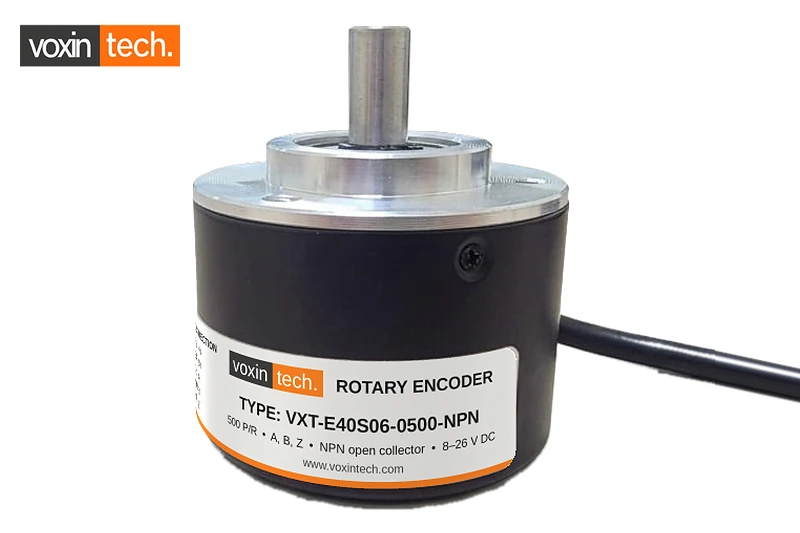
Most encoder problems on commissioning day are wiring problems. The encoder is working, but the PLC counts nothing, counts in the wrong direction, or drifts at high speed. This guide covers the wiring for each VXT encoder output type, the standard wire colours, and the checks that fix most counting issues.
VXT encoder wire colours
All VXT encoders use the same colour code, which makes panel drawings and spares simpler.
| Wire colour | Signal | Used on |
|---|---|---|
| Red | +V supply | All models |
| Black | 0 V | All models |
| Green | A | All models |
| White | B | All models |
| Yellow | Z (index) | Models with Z channel |
| Brown | /A | Line driver models |
| Grey | /B | Line driver models |
| Orange | /Z | Line driver models |
| Shield (bare) | Frame ground | All models |
Supply: 8 to 26 V DC for NPN, PNP and totem pole models; 5 V DC for line driver models. Always check the label before powering up.
Wiring an NPN open collector encoder
Models: VXT-E40S06-0500-NPN, VXT-E40S06-1024-NPN, VXT-E38S06-0360-NPN.
- Red to +24 V, black to 0 V of the same supply that powers the PLC inputs.
- Green (A), white (B) and yellow (Z, if present) to the PLC high-speed counter inputs.
- Configure the inputs for NPN sensors. On many compact PLCs this means connecting the input common terminal (often marked S/S, COM or 1M) to +24 V. Check your PLC manual.
- If the receiving device needs a voltage signal rather than a sinking input, add a pull-up resistor (typically 1 to 4.7 kΩ) from each output to +V.
Wiring a PNP open collector encoder
Model: VXT-E40S06-1024-PNP.
- Red to +24 V, black to 0 V.
- A, B and Z to the high-speed counter inputs.
- Configure the inputs for PNP sensors. On many PLCs, this means connecting the input common to 0 V.
- For a voltage-type receiver, add a pull-down resistor from each output to 0 V.
Wiring a totem pole encoder
Models: VXT-E50S08-1000-T, VXT-E50S08-1024-T, VXT-E50S08-2500-T.
Wire supply and signals the same way as above. The totem pole output drives the line both high and low, so it works whether the PLC inputs are configured for NPN or PNP sensors. No external resistor is needed in most installations.
Wiring a line driver encoder
Models: VXT-E40S06-1024-L, VXT-E58S06-1024-L, VXT-E58S10-5000-L.
- Red to +5 V and black to 0 V, usually supplied by the drive or the line driver input module.
- Connect each pair to a differential input: green (A) and brown (/A), white (B) and grey (/B), yellow (Z) and orange (/Z).
- Use twisted-pair cable for any extension, keeping each signal with its inverted partner.
- Do not connect a line driver encoder to a standard 24 V PLC input. It needs an RS-422 receiver, such as a line driver input card or a servo drive encoder input.
Connecting to popular PLCs
Compact PLCs widely used in India, such as Delta DVP, Mitsubishi FX and iQ-F, Siemens S7-1200, Omron CP series and others, include built-in high-speed counter inputs. The steps are similar on all of them:
- Find which inputs support high-speed counting and which counter mode (single phase, up/down, or A/B phase) they offer.
- Wire A and B to the inputs assigned to the A/B phase counter. Use Z only if you need a reference or reset.
- Select the A/B phase (quadrature) mode and the multiplication (1x, 2x or 4x) in the PLC configuration.
- Check the maximum input frequency for those inputs and compare it with your encoder frequency: rpm × PPR ÷ 60.
Shielding and noise: the most common cause of drifting counts
- Earth the encoder cable shield at one end only, at the controller or panel earth bar.
- Keep encoder cables at least 300 mm away from motor, VFD and servo power cables. Cross them at 90° if they must meet.
- Do not run encoder signals in the same multi-core cable as AC control or power wiring.
- For long runs or noisy panels, use a line driver encoder.
- Fit ferrites or output filters on VFDs if counts jump when the drive starts.
Troubleshooting checklist
| Symptom | Likely cause | Fix |
|---|---|---|
| No counts at all | Wrong input type (NPN vs PNP), no supply, or input common wired wrongly | Check supply on red/black; check the input common; swap to the correct output type |
| Counts in the wrong direction | A and B swapped, or direction setting | Swap the A and B wires, or invert direction in the PLC |
| Counts drift or jump | Noise, shield not earthed, cable near VFD | Earth the shield at one end; reroute the cable; consider a line driver encoder |
| Misses counts at high speed | Frequency above input limit | Lower PPR, use a faster input, or use 1x decoding |
| Count is 4x too high | PLC set to 4x quadrature | Adjust scaling or select 1x mode |
| Encoder hot or damaged | 24 V applied to a 5 V line driver | Check the label; line driver models need 5 V DC |
Frequently Asked Questions
What are the wire colours of a VXT encoder?
Red +V, black 0 V, green A, white B, yellow Z, and on line driver models brown /A, grey /B and orange /Z. The bare shield goes to frame ground.
Do I need a pull-up resistor for an NPN encoder?
Not when the PLC input is configured for NPN sensors. You need one only when the receiver expects a voltage signal.
Why is my encoder counting backwards?
Channels A and B are swapped relative to the direction your program expects. Swap the two wires or change the direction setting in the PLC.
Can I extend the encoder cable?
Yes, using shielded twisted-pair cable. For long runs or noisy environments, choose a line driver encoder such as VXT-E40S06-1024-L.
Need wiring help?
Send us your PLC model and the VXT encoder you are using, and we will help you with the connection. Contact us for datasheets, pricing and availability across India.
Related VXT products
VXT-E40S06-1024-NPN • VXT-E40S06-1024-PNP • VXT-E50S08-1024-T • VXT-E40S06-1024-L
Related guides
Delta, Mitsubishi, Siemens, Omron and Autonics are trademarks of their respective owners. They are mentioned for reference only; VXT is not affiliated with these companies.