


by Voxintech-admin@2022 Voxintech-admin@2022 No Comments

M12 Sensor Junction Box & Sensor Distribution Box: Complete Wiring Guide

A modern machine can carry twenty, fifty or more sensors, and every one of them needs a clean, reliable path back to the PLC. Running an individual cable from each sensor to the control panel is slow to install, expensive in cable and cable tray, and painful to fault-find. An M12 sensor junction box — also called a sensor distribution box or splitter box — solves all three problems at once. This guide explains what these boxes do, how junction boxes and distribution boxes differ, and how to choose the right port count for your machine.
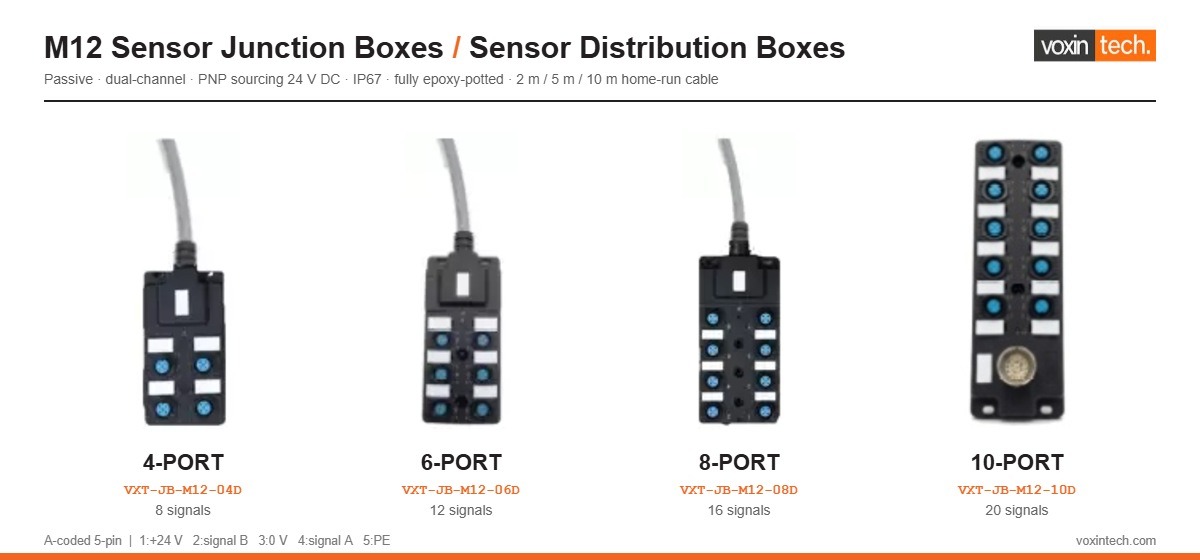
M12 sensor junction box and sensor distribution box range from Voxintech in 4, 6, 8 and 10 port versions
Voxintech VXT-JB-M12 series — 4, 6, 8 and 10-port M12 sensor junction boxes and sensor distribution boxes.

What is an M12 sensor junction box?

An M12 sensor junction box is a rugged, passive connectivity hub that uses standardised M12 circular connectors to link several field devices — proximity sensors, photoelectric sensors, actuators and switches — to a single multi-core home-run cable running back to the PLC or remote I/O module.

Instead of routing dozens of individual wires through cable trays, the box is mounted close to the sensor cluster. Each sensor plugs in with a short M12 cordset, and one home-run cable does the long trip to the cabinet. The result is less cable, less labour and a far tidier machine.

Key features to look for

  • M12 quick-connect ports — tool-free sensor and actuator connection, no wire stripping
  • IP67-rated sealed housing — protection against dust, coolant, oil and washdown
  • Epoxy-resin potted body — no screw terminals to loosen under vibration
  • LED indicators per port — power and signal status visible at the machine
  • 5-pin A-coded sockets — the industry-standard pinout, accepts any brand of M12 cordset
  • PNP (sourcing) 24 V DC operation — matched to standard automation I/O
  • Wide temperature and vibration rating — suitable for real factory conditions

Benefits of using an M12 junction box

  1. Faster installation — plug-and-play M12 connectors remove manual stripping and terminal screwing, typically cutting sensor wiring time by more than half.
  2. Reduced downtime — LED indicators show at a glance which sensor has dropped out, so maintenance finds the fault at the machine instead of tracing wires in the panel.
  3. Improved reliability — sealed, potted construction resists vibration, moisture and contamination far better than a terminal strip in a small enclosure.
  4. Scalability — sensors can be added or swapped without rewiring the panel.
  5. Lower total cost of ownership — less labour, fewer wiring errors, less cable and lower maintenance cost over the life of the machine.

Common applications

  • Packaging and material handling lines
  • Automotive assembly and robot cells
  • Food and beverage processing (washdown areas)
  • CNC machine tools
  • Conveyor and sorting systems

Sensor distribution boxes: 4, 6, 8 and 10-port options

A sensor distribution box performs the same job on a larger scale: it acts as a centralised distribution point that carries power out to the field devices and signals back on one trunk cable. Port count is the main selection decision.

The Voxintech VXT-JB-M12 series is available in 4, 6, 8 and 10-port versions, each with a moulded home-run cable in 2 m, 5 m or 10 m lengths. Every port is a dual-channel M12x1 female socket, so an 8-port box carries up to 16 signals and a 10-port box up to 20 signals on a single cable. Each port also accepts an ordinary 3-wire single-signal sensor on one channel, which means one box covers both single-channel and dual-channel requirements at the same port count.

Typical distribution box specification

  • Ports: M12x1 female, A-coded, 5-pin, nickel-plated brass threads
  • Pinout: 1 = +24 V, 2 = signal B, 3 = 0 V, 4 = signal A, 5 = PE
  • Supply: 24 V DC nominal (10–30 V DC), PNP sourcing outputs
  • Current: approx. 2 A per channel, 4 A per port, 8 A per box
  • Diagnostics: 1 green power LED plus 1 yellow signal LED per channel
  • Construction: fully epoxy-potted body, gold-plated contacts, IP67 with all ports mated or capped

Benefits of a multi-port distribution box

  1. Centralised wiring architecture — one trunk cable replaces dozens of home-run cables to the PLC.
  2. Simplified maintenance — a faulty sensor is isolated and replaced without disturbing the rest of the system.
  3. Space savings — less panel clutter and far less congestion in cable trays and drag chains.
  4. Cost-efficient scaling — add sensors incrementally instead of redesigning the wiring harness.
  5. Faster commissioning — the machine builder wires to a known pinout, so the same cordsets work everywhere.

M12 junction box vs sensor distribution box: which do you need?

Feature M12 junction box Sensor distribution box
Best for Small to medium sensor groups Medium to large sensor networks
Typical port count 4–6 ports 8–10 ports
Signals carried Up to 12 (dual channel) Up to 20 (dual channel)
Ideal use case Machine-level wiring Cell or line-level distribution
Diagnostics LED per channel LED per channel
Example VXT-JB-M12-04D-05M VXT-JB-M12-10D-05M

In practice the two terms describe the same family of product. Both share the goal of simplifying cabling, reducing downtime and improving serviceability — the right choice comes down to sensor count, machine layout and how much spare capacity you want to leave for future additions. A useful rule of thumb: choose a box with at least one or two spare ports beyond today’s requirement.

Why IP67 and epoxy potting matter

Industrial environments expose wiring to dust, coolant, oil, vibration and washdown cycles. An IP67-rated M12 distribution box meets the IEC 60529 IP rating for total dust ingress protection and temporary immersion, provided every unused port is fitted with a protective cap.

Potting matters just as much as the IP rating. A box with internal screw terminals has connections that can work loose under continuous vibration, and any moisture that does get in has somewhere to sit. A fully epoxy-potted body with gold-plated contacts has no serviceable joints inside to fail, which is why potted boxes are the standard choice for welding cells, presses and high-vibration conveyor equipment.

Installation best practices

  • Mount the box as close to the sensor cluster as possible to keep cordsets short.
  • Cap every unused port — an open port destroys the IP67 rating of the whole box.
  • Use labelled or colour-coded M12 cordsets so port numbers map clearly to PLC addresses.
  • Check the supply capacity: total sensor load must stay within the per-port and per-box current limits.
  • Route the home-run cable away from VFD and motor cables to reduce electrical noise.
  • Inspect connector seals periodically in washdown and high-vibration areas.
  • Confirm sensor switching type — PNP boxes require PNP (sourcing) sensors.

Voxintech M12 junction box and distribution box range

Voxintech manufactures and supplies M12 sensor junction boxes in India and Europe across four port counts and three cable lengths:
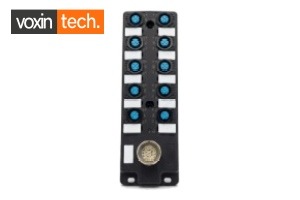
VXT-JB-M12-10D 10-port sensor distribution box with M12 ports and status LEDs
VXT-JB-M12-10D — a 10-port sensor distribution box carrying up to 20 signals on one cable.

Frequently asked questions

What is the difference between a junction box and a distribution box?

In sensor wiring the two terms are used interchangeably. Where a distinction is made, a junction box usually groups a smaller number of sensors onto one cable run, while a distribution box handles a higher port count for centralised, cell-level wiring.

Are M12 junction boxes waterproof?

Industrial-grade M12 junction boxes are rated IP67, meaning they are protected against dust and temporary immersion — suitable for washdown areas. The rating only holds if every unused port is fitted with a sealing cap.

Can I use NPN sensors with a PNP distribution box?

No. A PNP (sourcing) box must be used with PNP sensors and PNP-configured PLC inputs. Mixing switching types will not work and can damage inputs, so always confirm the sensor type before wiring.

How many sensors can a 10-port distribution box support?

A 10-port dual-channel box supports up to 10 dual-signal devices — 20 signals in total — or up to 10 standard 3-wire single-signal sensors, all on one home-run cable.

Do these boxes need a power supply of their own?

No. Power arrives through the home-run cable from the panel and is distributed to every port, so no separate supply is needed at the machine.

Do junction boxes require a PLC to function?

No. These are passive wiring aids — they do not process logic. They simply route power out to the field devices and signals back to whatever controller you are using.

Conclusion

Whether you are wiring a single machine or a full production line, M12 sensor junction boxes and sensor distribution boxes are essential building blocks for efficient, reliable automation. They cut installation time, simplify troubleshooting and protect the sensor network from the realities of the factory floor. Choosing the right box comes down to port count, cable length and the switching type of your sensors.

Ready to simplify your sensor wiring? Explore the full Voxintech M12 junction box and sensor distribution box range to find the right fit for your application, or contact our team for help selecting a port count.

by Voxintech-admin@2022 Voxintech-admin@2022 No Comments

What Is an M12 Sensor Junction Box? The Complete Guide

An M12 sensor junction box, also called a sensor distribution box or splitter box, is a passive device that collects the signals from several sensors and carries them back to the control panel on a single cable. Instead of running one cable from every sensor all the way to the cabinet, each sensor plugs into a nearby box with a short cordset, and one multi-core home-run cable does the long trip. It is one of the simplest ways to cut wiring cost, tidy a machine, and speed up fault-finding.

What a junction box actually does

A machine can easily carry twenty or thirty proximity, photoelectric and reed switches. Wired individually, that is twenty or thirty cables threading through trunking to the panel, each needing its own gland and its own set of terminals. A distribution box consolidates that. Sensors plug into M12 ports on the box using standard cordsets; the box combines every signal onto one home-run cable with a single connector or a single gland at the panel end.

The box is passive: it contains no logic and no power supply of its own. It carries 24 V DC out to the sensors and brings their switching signals back. Because there is nothing active inside, it is extremely reliable and needs no configuration.

The anatomy of a distribution box

Whatever the brand, the parts are the same:

  • Ports: 4, 6, 8 or 10 female M12 sockets, usually A-coded, where the sensors plug in.
  • Home-run cable or connector: the single multi-core trunk back to the panel, either a fixed moulded cable or an M23 quick-disconnect.
  • Status LEDs: a power LED plus one LED per signal, so a technician can read sensor state at the machine.
  • Housing: a sealed, often fully epoxy-potted body rated to IP67 so it survives dust, coolant and wash-down.

Why use one instead of wiring sensors directly

  • Less cable and fewer glands: one home-run replaces many individual runs, so trunking is smaller and cheaper.
  • Faster wiring: plugging in cordsets is quicker and less error-prone than landing dozens of cores on terminals.
  • Quicker diagnostics: LEDs at the box show which sensor is switched without a meter or a trip to the panel.
  • Cleaner maintenance: a faulty sensor is unplugged and swapped in seconds, with no rewiring.

The main types you will see

By port count

4-port boxes suit compact machines and single stations; 6- and 8-port boxes are the workhorses of packaging and assembly lines; 10-port boxes handle high-density stations and long conveyors where twenty signals share one cable.

By channel (signals per port)

Single-channel boxes carry one signal per port. Dual-channel boxes carry two, which suits double-acting pneumatic cylinders that use two magnetic sensors. A dual-channel box can also take a single-signal sensor on one channel, so it covers both cases.

By output logic

Boxes are configured for PNP (sourcing) or NPN (sinking) sensors. This mainly affects how the status LEDs are wired, but sensor, box and PLC input should all agree.

By home-run type

A fixed moulded cable is simplest and cheapest. An M23 quick-disconnect lets the trunk cable be unplugged, which some machine builders prefer for servicing.

Key specifications to check before you buy

  • Number of ports and signals per port (single or dual channel).
  • Output logic: PNP or NPN.
  • Home-run cable length and connector type.
  • IP rating and housing construction (potted vs terminal-strip).
  • Pinout: the near-universal 5-pin A-coded standard accepts cordsets from any brand.

Frequently Asked Questions

Is a junction box the same as a distribution box or a splitter box?

Yes. In sensor and automation wiring these terms are used interchangeably for the same device: a passive box that consolidates several sensor signals onto one home-run cable.

Does a junction box need power or programming?

No. It is passive. It simply passes 24 V DC out to the sensors and their signals back to the panel. There is nothing to configure and nothing that can be corrupted.

Can I mix sensor brands on one box?

Yes, as long as the connectors and output logic match. The 5-pin A-coded M12 standard is shared across manufacturers, so cordsets from different brands plug into the same box.

Need help choosing? Voxintech stocks M12 sensor distribution boxes from 4 to 10 ports in Noida, Delhi NCR, with datasheets, GST invoicing and ex-stock dispatch. Send us your sensor count and we will size the right box for your machine.

Related Voxintech products

Browse Voxintech M12 sensor junction boxes – 4, 6, 8 and 10-port dual-channel distribution boxes with 2 m, 5 m and 10 m home-run cables, in stock in Noida, Delhi NCR.

Read next

by Voxintech-admin@2022 Voxintech-admin@2022 No Comments

M12 Sensor Distribution Box Buying Guide (India): Ports, Prices and What to Check

Choosing an M12 sensor distribution box is straightforward once you work through five questions in order: how many sensors, one signal or two per port, PNP or NPN, how long a cable, and how tough the environment. Get those right and the part number falls out. This guide walks through each, with a note on what these boxes cost in the Indian market so you can sanity-check a quote.

Step 1: Count your sensors and size the ports

Start by counting the sensors in the cluster the box will serve, then leave headroom. A station with six sensors today may grow to eight, and it is cheaper to fit an 8-port box now than to add a second box later.

  • Up to 4 sensors: a 4-port box, ideal for a compact machine or a single station.
  • 5 to 6 sensors: a 6-port box.
  • 7 to 8 sensors: an 8-port box, the most common size on packaging and assembly lines.
  • 9 to 10 sensors, or a long run: a 10-port box, which puts twenty signals on one cable and often replaces two smaller boxes.

Step 2: One signal or two per port?

This is the single most common specification error. A single-channel port carries one signal; a dual-channel port carries two. Double-acting pneumatic cylinders use two magnetic reed switches, one for each end position, so on a machine full of cylinders a dual-channel box lets each cylinder occupy one port instead of two. A dual-channel box also accepts a single-signal sensor on one channel, so choosing dual channel is the safe default when you are unsure. See our dedicated single-versus-dual-channel guide for the full explanation.

Step 3: PNP or NPN?

The box must match your sensors' output logic. PNP (sourcing) is the modern European standard and the most common choice on new machines; NPN (sinking) is still found on older equipment, particularly Japanese-built machines. The sensor, the box and the PLC input card should all agree. Our PNP-versus-NPN guide explains how to check and how to avoid a costly mismatch.

Step 4: Choose the home-run cable length

  • 2 m: for a box mounted close to the panel or on a compact machine, and the sharpest price.
  • 5 m: the general-purpose length that covers most mid-span mounting positions.
  • 10 m: for a box at the far end of a long conveyor or on a machine sited away from its cabinet.

Order the length you need; excess cable coiled in the tray is wasted money and clutter.

Step 5: Match the build to the environment

For anything beyond a clean, dry panel, insist on a fully potted box rated to IP67. Epoxy potting leaves no cavity for condensation and no screw terminals to shake loose, which is why potted boxes survive on machines that vibrate continuously or get washed down. Look also for gold-plated contacts and nickel-plated brass threads. Our construction guide covers why this matters.

What these boxes cost in India

As a rough guide for an 8-port dual-channel box with a 5 m cable: unbranded imports sit at the bottom of the market with little support or datasheet continuity; established Korean brands occupy the trusted mid-market; and German premium brands sit well above, often with long lead times on non-stock variants. A branded Indian-supplied alternative aims to give you a real datasheet, a stable part number and local stock at a price close to the mid-market. Always get two quotes and check the total landed price, not just the headline unit rate.

Frequently Asked Questions

How many ports do I need?

Count the sensors the box will serve and add headroom. Four to six sensors suit a 4- or 6-port box; seven to eight suit an 8-port; nine or ten, or a long run, suit a 10-port.

Should I default to single or dual channel?

If in doubt, choose dual channel. It handles double-acting cylinders that need two sensors, and it still accepts single-signal sensors on one channel, so it covers both cases.

Why do prices vary so much for a similar-looking box?

The gap is construction quality, brand, datasheet support and stock. Fully potted boxes with brass threads and proper certification cost more than unbranded ones, but they fail far less often in service, which is where the real cost of a cheap box shows up.

Need help choosing? Voxintech stocks M12 sensor distribution boxes from 4 to 10 ports in Noida, Delhi NCR, with datasheets, GST invoicing and ex-stock dispatch. Send us your sensor count and we will size the right box for your machine.

Related Voxintech products

Browse Voxintech M12 sensor junction boxes – 4, 6, 8 and 10-port dual-channel distribution boxes with 2 m, 5 m and 10 m home-run cables, in stock in Noida, Delhi NCR.

Read next

by Voxintech-admin@2022 Voxintech-admin@2022 No Comments

Single-Channel vs Dual-Channel M12 Distribution Boxes: Which Do You Need?

The difference between a single-channel and a dual-channel distribution box comes down to how many signals each port carries. It sounds trivial, but choosing wrong means either paying for capacity you do not use or, worse, discovering on commissioning day that half your cylinder sensors have nowhere to go. Here is how to get it right.

The short version: one signal or two per port

A single-channel port carries one switching signal back to the panel. A dual-channel port carries two, completely independently. On the box this is the difference between a 3-wire connection per port and a 4-wire connection per port, which is why single-channel boxes are sometimes labelled 3-wire and dual-channel boxes 4-wire.

Why dual channel exists: pneumatic cylinders

The reason dual-channel boxes are so common in packaging and assembly is the double-acting pneumatic cylinder. Each cylinder typically has two magnetic reed switches clamped to it, one sensing the extended position and one the retracted. That is two signals from one device sitting in one place. A dual-channel port lets that cylinder plug into a single socket and send both signals down the shared cable. On a machine with eight cylinders, a dual-channel 8-port box handles all sixteen signals; a single-channel box would need sixteen ports, or two boxes.

What changes inside the cable

Because a dual-channel box carries twice as many signals, its home-run cable has more cores. An 8-port single-channel box needs eight signal cores plus power; an 8-port dual-channel box needs sixteen signal cores plus power. That extra copper is the main reason a dual-channel box costs a little more, and it is money well spent when your machine is cylinder-heavy.

The key point: dual channel covers both cases

Here is the fact that simplifies the decision. A single-signal sensor plugs happily into a dual-channel port and simply uses one of the two channels; the second stays idle. That means a dual-channel box can do everything a single-channel box can, plus handle two-signal devices. A single-channel box cannot do the reverse.

So a dual-channel box is a superset. If you standardise your machines on dual-channel boxes, one part covers plain proximity sensors and double-acting cylinders alike, which reduces the number of line items you stock and the chance of ordering the wrong thing.

When single channel still makes sense

If a station has only simple single-signal sensors, no pneumatic cylinders, and cost is tight, a single-channel box is a touch cheaper and perfectly correct. But for most packaging, filling and assembly machines, the flexibility of dual channel is worth the small premium.

Frequently Asked Questions

What is the difference between a 3-wire and a 4-wire distribution box?

It refers to how each port is wired. A 3-wire port carries one signal (single channel); a 4-wire port carries two independent signals (dual channel). The extra wire is the second signal.

Can a dual-channel box be used with normal single-signal sensors?

Yes. A single-signal sensor uses one channel of the port and leaves the other unused. This is why dual channel is a safe default: it handles both single- and two-signal devices.

Do I need dual channel for pneumatic cylinders?

Usually, yes. A double-acting cylinder has two position sensors, so a dual-channel port lets it occupy one socket instead of two, halving the ports and cable you need.

Need help choosing? Voxintech stocks M12 sensor distribution boxes from 4 to 10 ports in Noida, Delhi NCR, with datasheets, GST invoicing and ex-stock dispatch. Send us your sensor count and we will size the right box for your machine.

Related Voxintech products

Browse Voxintech M12 sensor junction boxes – 4, 6, 8 and 10-port dual-channel distribution boxes with 2 m, 5 m and 10 m home-run cables, in stock in Noida, Delhi NCR.

Read next

by Voxintech-admin@2022 Voxintech-admin@2022 No Comments

PNP vs NPN Sensor Junction Boxes: How to Choose and Avoid Returns

PNP and NPN describe how a sensor switches its output, and getting it wrong is one of the easiest ways to buy the wrong distribution box. The good news is that the rule is simple once you understand what the box is actually doing, and this guide gives you a check you can run before you order.

PNP and NPN in one paragraph

A PNP sensor switches the positive line: when it detects a target, it connects its output to +24 V. It is called sourcing because it sources current to the load. An NPN sensor switches the negative line: it connects its output to 0 V, sinking current from the load. Both do the same job of signalling on or off; they just do it from opposite rails.

Why the distribution box cares

The signal path through a passive box is the same either way, so the box will pass a signal regardless. Where PNP and NPN matter is the status LEDs. Those indicators are wired to light for a particular current direction, so a box built for PNP sensors has its LEDs oriented for sourcing signals. Feed it NPN sensors and the signals still reach the PLC, but the LEDs may not illuminate as intended, which defeats the point of having on-box diagnostics.

For that reason, boxes are sold as PNP or NPN versions, and you should match the box to your sensors so the indicators work correctly.

Which one do you have?

  • New machines, European design, most modern sensors: almost always PNP. It is the de facto standard in Europe and increasingly worldwide.
  • Older equipment, some Japanese-built machines and legacy lines: often NPN.
  • The safest answer: read the sensor datasheet. It will state PNP or NPN explicitly, usually alongside NO (normally open) or NC (normally closed).

The three-way match that prevents returns

Three things must agree: the sensor output, the distribution box, and the PLC digital input card. If your sensors are PNP, use a PNP box and a PLC input card configured for sourcing sensors (sinking inputs). Mixing a PNP sensor into an NPN-expecting input, or vice versa, gives you an input that never switches or one that is always on.

Before ordering, confirm the sensor logic from its datasheet, choose the matching box version, and check the PLC input card supports it. That thirty-second check is what stands between you and a box that has to go back.

A note on cross-referencing brands

When replacing a competitor's box, match the logic as well as the port count. A PNP box is the correct replacement for a PNP part; do not swap it against an NPN part number without confirming your sensors, because the indicators will not behave as expected even though the signals pass.

Frequently Asked Questions

What does PNP mean on a sensor junction box?

It means the box is built for PNP (sourcing) sensors, which switch the +24 V line. Its status LEDs are oriented for that current direction, so it should be paired with PNP sensors.

Will an NPN sensor work on a PNP box?

The signal will physically pass through the passive box, but the status LEDs are designed for PNP and may not light correctly. For reliable diagnostics, match the box to your sensor type.

How do I know if my sensors are PNP or NPN?

Check the sensor's datasheet or part number. It will state PNP or NPN, usually alongside whether the contact is normally open or normally closed.

Need help choosing? Voxintech stocks M12 sensor distribution boxes from 4 to 10 ports in Noida, Delhi NCR, with datasheets, GST invoicing and ex-stock dispatch. Send us your sensor count and we will size the right box for your machine.

Related Voxintech products

Browse Voxintech M12 sensor junction boxes – 4, 6, 8 and 10-port dual-channel distribution boxes with 2 m, 5 m and 10 m home-run cables, in stock in Noida, Delhi NCR.

Read next

by Voxintech-admin@2022 Voxintech-admin@2022 No Comments

M12 Junction Box Wiring and Pinout Explained (5-Pin A-Coded)

Most M12 sensor distribution boxes follow one near-universal wiring standard: the 5-pin A-coded pinout. Learn it once and you can wire, cross-reference and troubleshoot boxes from any manufacturer, because they nearly all share it. This guide lays out the pinout, explains each pin, and shows how a dual-channel port maps a double-acting cylinder.

The standard 5-pin A-coded pinout

On a dual-channel 5-pin distribution box, each M12 port uses the same assignment:

Pin Function Typical cordset colour
1 +24 V DC (power to sensor) Brown
2 Signal B (2nd signal, dual channel) White
3 0 V (common return) Blue
4 Signal A (primary signal) Black
5 PE / FE (earth) Grey

Pins 2 and 4 carry the two independent switching signals (channels B and A). On a single-channel box only one signal pin is used per port; the pinout is otherwise identical, which is part of why the standard is so convenient.

What each pin does

  • Pin 1 (+24 V DC): supplies power out to the sensor. Usually brown in a standard cordset.
  • Pin 2 (Signal B): the second switching signal on a dual-channel port. Usually white.
  • Pin 3 (0 V): the common return. Usually blue.
  • Pin 4 (Signal A): the primary switching signal, and the only signal used on a single-signal sensor. Usually black.
  • Pin 5 (PE / FE): protective or functional earth. Usually grey; not present on 4-pin cordsets.

Because a 4-pin sensor cordset simply omits pin 5, it still mates with a 5-pin A-coded socket. That means a 5-pin dual-channel box also accepts 4-pin single-signal sensors.

The home-run side

All the port signals are combined into the home-run trunk, which reaches the panel either as a fixed moulded cable or through an M23 quick-disconnect connector. The trunk has one core per signal plus the shared power and earth cores, so an 8-port dual-channel box carries sixteen signal cores plus power and earth. At the panel, each core lands on its own PLC input terminal.

Worked example: wiring a double-acting cylinder

A double-acting cylinder has two reed switches: one senses the extended position, one the retracted. With a Y-splitter or a twin cordset, both switches connect to a single dual-channel port. The extended-position switch maps to Signal A (pin 4) and the retracted-position switch to Signal B (pin 2). Both travel down the home-run to two adjacent PLC inputs. One port, one plug, two signals, no wiring on terminals.

Common wiring mistakes to avoid

  • Ignoring output logic: a PNP box wired with NPN sensors passes signals but the LEDs will not indicate correctly.
  • Leaving unused ports open: fit protective caps or the box loses its IP67 rating at that socket.
  • Assuming single channel: plugging a two-signal cylinder into a single-channel box loses the second signal.
  • Over-tightening M12 connectors: hand-tight plus a light nip is enough; the seal is in the thread and the O-ring.

Frequently Asked Questions

What is the standard M12 5-pin pinout for a sensor box?

Pin 1 is +24 V, pin 2 is signal B, pin 3 is 0 V, pin 4 is signal A, and pin 5 is protective earth. This A-coded assignment is shared across almost all manufacturers.

Can a 4-pin sensor plug into a 5-pin box?

Yes. A 4-pin A-coded cordset mates with a 5-pin A-coded socket; it simply does not use pin 5. So a 5-pin dual-channel box accepts 4-pin single-signal sensors.

Why must I cap unused ports?

An open M12 socket breaks the box's IP67 seal at that point, letting in dust and moisture. A protective cap restores the rating on ports you are not using.

Need help choosing? Voxintech stocks M12 sensor distribution boxes from 4 to 10 ports in Noida, Delhi NCR, with datasheets, GST invoicing and ex-stock dispatch. Send us your sensor count and we will size the right box for your machine.

Related Voxintech products

Browse Voxintech M12 sensor junction boxes – 4, 6, 8 and 10-port dual-channel distribution boxes with 2 m, 5 m and 10 m home-run cables, in stock in Noida, Delhi NCR.

Read next

by Voxintech-admin@2022 Voxintech-admin@2022 No Comments

How to Reduce Sensor Wiring in Your Control Panel

If your control panels are a wall of cable glands and your wiring labour keeps climbing, the sensors are usually the culprit. A modern machine carries dozens of them, and wired individually each one is a cable, a gland and a set of terminals. Sensor distribution boxes are the standard fix, and the saving is easy to quantify.

The problem: one cable per sensor

Traditionally every sensor runs its own cable back to the panel. Twenty sensors mean twenty cables in the trunking, twenty glands drilled and sealed in the enclosure wall, and up to sixty cores to land on terminals inside. That is expensive in cable, in enclosure space, and above all in labour, and it makes fault-finding slow because every sensor is buried in the same bundle.

The fix: consolidate at the machine

A sensor distribution box mounted near a cluster of sensors reverses this. Each sensor plugs into the box with a short cordset, and a single multi-core home-run cable carries every signal back to the panel. Twenty sensors served by three boxes become three home-run cables and three glands instead of twenty of each.

The saving, in numbers

Take one 8-port dual-channel box handling sixteen signals. Wired the old way that is up to sixteen cables and sixteen glands. With the box it is one home-run cable and one gland: fifteen fewer cable runs and fifteen fewer glands from a single box. Across a mid-size packaging machine with several such clusters, that is routinely a full day of wiring labour saved and a noticeably smaller cable tray.

  • Fewer glands to drill, fit and seal in the enclosure.
  • Less cable purchased and less trunking to hold it.
  • Fewer cores to terminate, so faster panel build and fewer wiring errors.
  • Smaller enclosure, because far fewer entries are needed.

The bonus: faster fault-finding

Distribution boxes carry status LEDs, one per signal. A technician standing at the machine can see which sensor is switched without a meter and without walking back to the panel. On a line running multiple shifts, that is the difference between a two-minute fault-find and a twenty-minute one, and over a year it dwarfs the cost of the boxes.

Design tips for the biggest saving

  • Group sensors by location and put a box at the centre of each cluster to keep cordsets short.
  • Use dual-channel boxes so double-acting cylinders occupy one port each.
  • Size up: an 8-port box that is half full today leaves room to add sensors without a new home-run.
  • For long conveyors, consider a 10-port box to keep twenty signals on a single cable.
  • Standardise on one box family and pinout across your machines to simplify stock and spares.

Frequently Asked Questions

How much wiring can a distribution box save?

A single 8-port box handling sixteen signals replaces up to sixteen individual cable runs and glands with one home-run and one gland, saving cable, enclosure space and a large share of the wiring labour.

Do distribution boxes make maintenance easier?

Yes. On-box status LEDs show sensor state at the machine, and a faulty sensor is unplugged and swapped in seconds without rewiring, which cuts downtime.

Where should I mount the box?

At the centre of a cluster of sensors so the cordsets stay short, and where its LEDs are visible to a technician at the machine.

Need help choosing? Voxintech stocks M12 sensor distribution boxes from 4 to 10 ports in Noida, Delhi NCR, with datasheets, GST invoicing and ex-stock dispatch. Send us your sensor count and we will size the right box for your machine.

Related Voxintech products

Browse Voxintech M12 sensor junction boxes – 4, 6, 8 and 10-port dual-channel distribution boxes with 2 m, 5 m and 10 m home-run cables, in stock in Noida, Delhi NCR.

Read next

by Voxintech-admin@2022 Voxintech-admin@2022 No Comments

IP67 and Epoxy Potting: Why Junction Box Construction Matters

Two distribution boxes can look identical and behave completely differently after a year on a machine. The difference is construction. A fully potted, IP67-rated box shrugs off vibration, coolant and wash-down; a hollow box with screw terminals slowly develops intermittent faults in the same spot. Here is what actually matters and why.

What IP67 means

IP67 is an ingress-protection rating. The first digit, 6, means the box is dust-tight: no dust enters at all. The second digit, 7, means it withstands temporary immersion in water to a defined depth and time. In practice an IP67 box is sealed against the dust, coolant spray and wash-down that are normal on packaging, food and machine-tool lines, provided every port is either mated with a cordset or fitted with a protective cap.

Potted versus terminal-strip boxes

The cheapest distribution boxes are hollow enclosures with screw terminals inside, wired by hand. They work on day one. The problem is what happens next. Two failure modes dominate:

  • Vibration loosens screw terminals. On a machine that runs continuously, screwed connections work loose over weeks and months, producing intermittent faults that are maddening to trace.
  • Condensation collects in the cavity. Any hollow enclosure breathes as it heats and cools, drawing in moist air that condenses inside and corrodes terminals.

A fully epoxy-potted box eliminates both. The interior is filled with resin, so there are no screw terminals to loosen and no cavity for condensation to form. There is simply nothing inside to fail.

Why this is the real cost of a cheap box

A distribution box is inexpensive relative to the machine it sits on. When a terminal-strip box develops an intermittent fault, the cost is not the box; it is the production stoppage, the hours spent chasing a fault that comes and goes, and the lost confidence in the line. Potting is cheap insurance against exactly that.

What to look for in a well-built box

  • Fully epoxy-resin potted body, not a hollow enclosure with a gasket.
  • IP67 rating with all ports mated or capped.
  • Gold-plated contacts, which keep contact resistance low and stable over thousands of mating cycles.
  • Nickel-plated brass port threads, which hold the seal and survive repeated connector changes far better than plastic threads.
  • A flame-retardant housing rated for the temperature and vibration of your machine.

Matching construction to the environment

For a clean, dry, low-vibration panel a basic box may be adequate. But for packaging, filling, food, beverage, machine-tool and weld-cell environments, insist on a potted IP67 box. The premium over a bottom-of-market box is small, and it is repaid the first time the line does not stop.

Frequently Asked Questions

What does IP67 mean for a junction box?

The 6 means fully dust-tight and the 7 means protected against temporary immersion in water. In practice it withstands dust, coolant and wash-down when all ports are mated or capped.

Why is a potted box better than one with screw terminals?

Potting removes the two things that fail: screw terminals that vibrate loose and a cavity where condensation collects. A resin-filled box has nothing inside to loosen or corrode.

Are gold-plated contacts worth it?

Yes. Gold plating keeps contact resistance low and stable across many mating cycles, so signals stay reliable over the life of the box and after repeated sensor changes.

Need help choosing? Voxintech stocks M12 sensor distribution boxes from 4 to 10 ports in Noida, Delhi NCR, with datasheets, GST invoicing and ex-stock dispatch. Send us your sensor count and we will size the right box for your machine.

Related Voxintech products

Browse Voxintech M12 sensor junction boxes – 4, 6, 8 and 10-port dual-channel distribution boxes with 2 m, 5 m and 10 m home-run cables, in stock in Noida, Delhi NCR.

Read next

by Voxintech-admin@2022 Voxintech-admin@2022 No Comments

Sensor Junction Boxes for Packaging Machines: A Panel Builder’s Guide

Packaging machines are among the most sensor-dense equipment on any factory floor, which makes them the natural home for sensor distribution boxes. For a panel builder or machine OEM, getting the box specification right saves wiring time on every build and cuts warranty callbacks. This guide covers how to specify boxes for packaging lines specifically.

Why packaging machines are sensor-heavy

A single packaging machine can carry dozens of sensors: product-present and position sensors along conveyors, magnetic switches on every pneumatic cylinder, photoelectric sensors on infeeds and discharges, and safety devices around guards. Cappers, cartoners, case erectors, fillers and palletisers are all dense with pneumatics, and each double-acting cylinder brings two signals. That density is exactly what distribution boxes are designed to manage.

Sizing boxes station by station

Rather than one giant box, put a box at each station or sensor cluster and keep cordsets short. A practical mapping:

  • Infeed or a single station with a handful of sensors: a 4- or 6-port box.
  • A typical filling, capping or cartoning station: an 8-port box, the workhorse size.
  • A long conveyor run or a rotary monoblock with many cylinders: a 10-port box, keeping twenty signals on one cable.

Leave spare ports on each box. Packaging lines are frequently modified, and a spare port means adding a sensor without pulling a new home-run cable.

Specify dual channel for the cylinders

Because pneumatic cylinders dominate packaging machines and each has two position sensors, dual-channel boxes are almost always the right choice. A dual-channel 8-port box lets eight cylinders, sixteen signals, share one box and one cable. It also still accepts the plain single-signal sensors elsewhere on the machine, so you can standardise the whole build on one box type.

Build for wash-down and vibration

Food and beverage packaging means wash-down; all packaging means continuous vibration. Specify fully potted IP67 boxes with brass port threads so the boxes survive both. Terminal-strip boxes are a false economy here: they are the parts that cause intermittent faults and warranty callbacks six months after the machine ships. Fit caps to every unused port so the IP rating holds across the machine.

The payoff for the machine builder

  • Faster builds: plugging cordsets is quicker than landing dozens of cores, so wiring time per machine drops.
  • Fewer callbacks: potted boxes do not develop the loose-terminal faults that generate service visits.
  • Cleaner machines: fewer cables and a smaller cable tray make for a tidier, more sellable build.
  • Easier commissioning: on-box LEDs let the commissioning engineer verify every sensor at a glance.
  • Simpler spares: one standardised box family across your machines simplifies your customers' spares holding.

Frequently Asked Questions

What size distribution box is best for a packaging machine?

Size per station: 4- or 6-port boxes for infeeds and single stations, 8-port boxes for typical filling or capping stations, and 10-port boxes for long conveyors or cylinder-heavy monoblocks. Leave spare ports for future changes.

Should packaging machine boxes be single or dual channel?

Dual channel, in almost all cases. Packaging machines are full of double-acting cylinders that each need two sensors, and dual-channel boxes still handle single-signal sensors, so one box type covers the whole machine.

Do the boxes need to be wash-down rated?

For food and beverage lines, yes. Specify fully potted IP67 boxes with brass threads, and cap unused ports, so the boxes survive wash-down and the constant vibration of a packaging line.

Need help choosing? Voxintech stocks M12 sensor distribution boxes from 4 to 10 ports in Noida, Delhi NCR, with datasheets, GST invoicing and ex-stock dispatch. Send us your sensor count and we will size the right box for your machine.

Related Voxintech products

Browse Voxintech M12 sensor junction boxes – 4, 6, 8 and 10-port dual-channel distribution boxes with 2 m, 5 m and 10 m home-run cables, in stock in Noida, Delhi NCR.

Read next

by Voxintech-admin@2022 Voxintech-admin@2022 No Comments

Looking for an Autonics PT Series Alternative? A Like-for-Like Cross-Reference

Autonics PT series distribution boxes are a well-regarded, widely stocked choice, and for good reason. But there are legitimate situations where a buyer needs an alternative: a shorter cable option, a higher port count, faster local stock, or simply a second source. This guide explains how to read the PT part number so you can match a box like for like, and it is written to help you specify correctly, not to knock a good product.

First, decode the Autonics PT part number

The PT naming is logical once you know the fields. Reading a typical 5-pin part such as PT8-4DP5-5:

  • PT: the distribution box series.
  • 8: the number of ports (also 4 or 6).
  • 4D: the connection type. 4D means DC 4-wire, that is two signals per port (dual channel). 3D means DC 3-wire, one signal per port (single channel).
  • P: the output logic. P is PNP; N is NPN.
  • 5: the connector, 5-pin.
  • -5: the cable length in metres (for example -5 or -10).

So PT8-4DP5-5 is an 8-port, dual-channel, PNP, 5-pin box with a 5 m cable, and PT8-3DP5-5 is the single-channel version of the same box. Once you can read the code, matching an alternative is simply a matter of matching each field.

What to match on a replacement

A like-for-like alternative should match five things:

  • Port count: 4, 6 or 8 to match the station.
  • Signals per port: dual channel (2 signals) or single channel (1 signal).
  • Output logic: PNP or NPN, to match your sensors so the LEDs indicate correctly.
  • Connector and pinout: 5-pin A-coded is the shared standard, so cordsets carry over.
  • Cable length: 2 m, 5 m or 10 m as your mounting position requires.

Match those and the alternative drops into the same footprint on the machine, using the same sensor cordsets and the same PLC inputs. It is worth confirming the mounting-hole centres if you want a no-drill swap.

Legitimate reasons to look for an alternative

  • Cable length: the PT cable range starts at 5 m. If you need a 2 m box for a compact machine, an alternative that offers 2 m keeps your cable tray tidy and your price sharp.
  • Port count: the PT series tops out at 8 ports. A machine needing twenty signals on one cable needs a 10-port box, which means looking beyond the standard PT range.
  • Local stock and lead time: a second source with ex-stock local availability protects your build schedule when a preferred part is on back-order.
  • A second supplier: dual-sourcing a commodity item is simply good procurement practice.

Being fair: where Autonics is the easy choice

It is worth being honest. Autonics enjoys strong brand recognition in India and is often the default write-in on a machine drawing, and that trust has real value. If your customer has specified Autonics by name and is happy with the price and availability, there may be no reason to change. An alternative earns its place on the specific merits above: cable length, port count, stock, or sourcing strategy. This guide is here for when one of those applies.

How to specify the alternative

Write down the Autonics part number you are replacing, decode it into ports, channel, logic and cable using the key above, and match each field on the alternative. Confirm the output logic against your sensors, and cap any unused ports to hold the IP rating. Done that way, the swap is routine and the machine behaves identically.

Frequently Asked Questions

What does PT8-4DP5-5 mean?

It is an Autonics 8-port distribution box, dual channel (4D, two signals per port), PNP (P), 5-pin, with a 5 m cable. The single-channel version is PT8-3DP5-5.

How do I find an equivalent to an Autonics PT box?

Decode the part number into port count, signals per port, output logic, connector and cable length, then match all five on the alternative. The shared 5-pin A-coded pinout means your existing cordsets carry over.

When is an alternative worth it over Autonics?

When you need a cable length or port count the PT range does not offer, when local stock and lead time matter for your build, or when you want a second source. If Autonics is specified and available at the right price, there may be no need to switch.

Need help choosing? Voxintech stocks M12 sensor distribution boxes from 4 to 10 ports in Noida, Delhi NCR, with datasheets, GST invoicing and ex-stock dispatch. Send us your sensor count and we will size the right box for your machine.

Related Voxintech products

Browse Voxintech M12 sensor junction boxes – 4, 6, 8 and 10-port dual-channel distribution boxes with 2 m, 5 m and 10 m home-run cables, in stock in Noida, Delhi NCR.

Read next